
What is a spec?
In Acai.sh, every spec is a ‘Functional Requirements Doc’ for a single feature in your product. It is written as afeature.yaml file.
Primarily, the spec is written as a list of acceptance criteria. It defines how your feature should behave, functionally. It also includes additional constraints or requirements that are neccesary for success.
Here is a minimalist example:
Where is the spec?
In Acai, specs are committed to git repositories as.yaml files.
mapperoni.com
features
map-editor
artifacts
map-editor.feature.yaml
map-viewer
data-export
map-data-explorer
src
.gitignore
Specs must be located in a
The file name must include the name of the feature.
features/ directory.The file name must include the name of the feature.
The Feature.yaml Document
All acai specs are yaml. Yaml has a few key benefits over markdown, but remains lightweight and flexible.Basic format
As shown in the example spec above, the document has three main sections:- feature: Metadata about the feature, such as its name, version, product and description.
- components: Functional requirements, organized into component groups.
- constraints: Cross-cutting or plumbing requirements (like performance, authorization, data privacy)
To be compatible with the acai.sh dashboard and CLI, your feature.yaml must have a
feature.name and feature.product defined.Advanced Tips
Feature.yaml supports some useful patterns for adding additional notes and context in a structured way.Notes and annotations
Notes and annotations
You can attach notes directly to requirements.
These are passed along to the acai.sh server and included in CLI / API response payloads.There are two ways to add notes.
Names and descriptions
Names and descriptions
Your
components and constraint groups support arbitrary name and description fields, which is a good place to add additional context.Nested Sub-requirements
Nested Sub-requirements
You can associate a sub-requirement to a parent (up to 1 level of depth). This makes it easy to insert more requirements without needed to renumber existing ones.
Cross-references
Cross-references
If one requirement relates to another, you can reference it using its complete ID (known as the ACID) like
my-feature.COMPONENT.1-1.Deprecate requirements
Deprecate requirements
Instead of deleting them, you may want to flag them as
deprecated to maintain a living history.What makes a good spec?
There are some important best practices to follow.- Focus on the functional behavior, and key engineering constraints, and ideally only things that can be tested with a pass/fail. Feel free to use
-noteanddescriptionto provide soft or higher level guidance. - Avoid superficial requirements (design, layout, aesthetics, copywriting, etc.) unless they are mission-critical. Otherwise your spec will grow too large and your product will grow too rigid.
- Omit obvious requirements. Have faith your developers can fill in the gaps!
- Be descriptive, not prescriptive. Say what needs to be implemented, avoid prescribing how it gets implemented.
- If you find yourself duplicating requirements in many specs, consider creating a
core.feature.yamlor just putting guard rails inAGENTS.mdand other docs. - The feature boundary is up to you, but smaller features are more maintainable. A small feature spec is easy to read and review, easy to ship and QA, easier to feature-flag and roll-back.
The Spec Lifecycle
Specs add the most value to teams working on complex, high-stakes projects. So how do we think about specs when working on a project with many services, many git repos, long-lived branches, and multiple QA cycles?Mental model / data model
Acai abstracts this complexity by breaking your project into 4 core concepts.
Let’s use an example to understand this better. Imagine a spec for a carbon calculator in a travel app.
- carbon-calculator.feature.yaml lives in your repo, on git branch called
backend/main. - The git branches
backend/mainandfrontend/mainare both tracked by the Production implementation.
This happens automatically, the first time you runacai push --all --target Production - Production is an implementation of the mobile-app product.
- When QA is done, all of the requirements defined in carbon-calculator.feature.yaml are marked as Accepted on Production
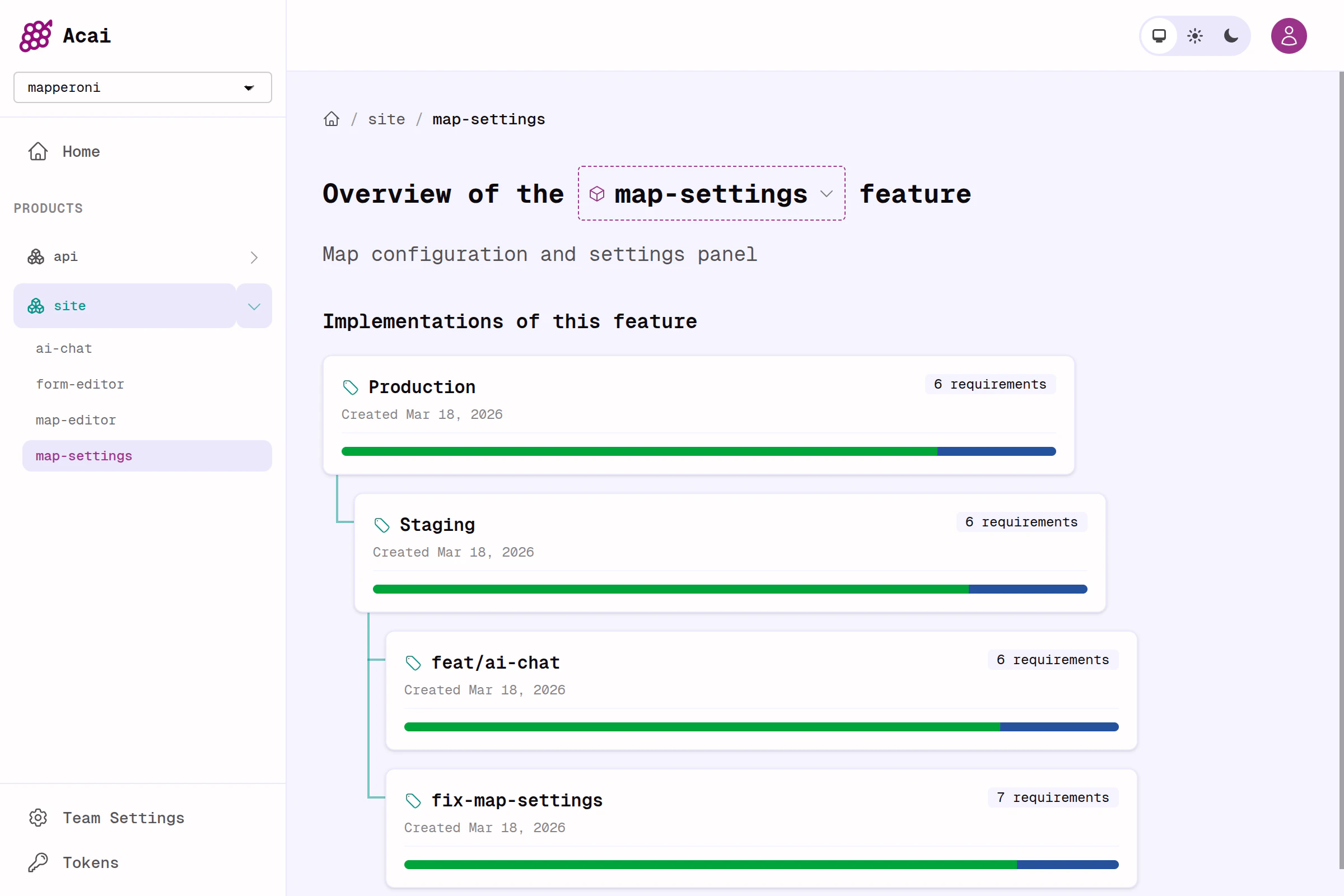
Example of a product overview showing states of a feature across many implementations.
Spec journey
So the lifecycle of a feature from draft spec to production may differ from team to team, but the simplest example is this;1
Create branch & write spec
Create a branch like
feat/carbon-calculator and draft your feature.yaml2
Push
Run
acai push to extract the specs and push them to an Acai Server. This creates a new implementation, which is named after your branch by default.3
Review
Invite your team to review by sending them a link to the Acai.sh dashboard for your new feature + implementation.
4
Integrate
When the spec and code passes QA, merge the code, delete the old implementation.
5
Push
When the feature is merged (e.g. to
main), push again from the main branch so that the dashboard reflects the current state of your app. CI / GitHub actions are useful here.specs repo. Acai.sh should work for all the common git workflows.