> ## Documentation Index
> Fetch the complete documentation index at: https://acai.sh/llms.txt
> Use this file to discover all available pages before exploring further.

# Spec-driven Development

> Introduction to `feature.yaml` specs, and best practices for spec-first software development.

export const StatesDiagram = () => {
  return <div className="not-prose rounded-[18px] border border-[#166E3F]/20 bg-[#D1FAE4] p-5 text-[#166E3F] transition-colors duration-200 hover:bg-[#C7F4DD] dark:border-[#6AE1A1]/20 dark:bg-[#0F4C2C] dark:text-[#6AE1A1] dark:hover:bg-[#125735]">
            <div className="mb-4">
                <div className="flex items-start justify-between gap-4">
                    <div className="text-sm font-medium text-[#166E3F] dark:text-[#6AE1A1]">
                        mobile-app
                    </div>
                    <div className="text-[11px] font-semibold uppercase tracking-[0.12em] text-[#166E3F]/70 dark:text-[#6AE1A1]/80">
                        Product
                    </div>
                </div>
            </div>

            <div className="rounded-[16px] border border-[#133A9A]/20 bg-[#E3EAFD] p-5 text-[#133A9A] transition-colors duration-200 hover:bg-[#D8E3FC] dark:border-[#7196F4]/20 dark:bg-[#07296A] dark:text-[#7196F4] dark:hover:bg-[#0A347F]">
                <div className="mb-4">
                    <div className="flex items-start justify-between gap-4">
                        <div>
                            <div className="text-sm font-medium text-[#133A9A] dark:text-[#7196F4]">
                                Production
                            </div>
                            <div className="mt-2 flex flex-wrap gap-2">
                                <div className="inline-flex items-center rounded-[8px] border border-[#133A9A]/15 bg-[#F0F4FE] px-2 py-0.5 text-xs font-medium tracking-[-0.1px] text-[#133A9A] dark:border-[#7196F4]/15 dark:bg-[#03153A] dark:text-[#7196F4]">
                                    <Icon icon="git-branch" size={14} className="mr-1.5" />
                                    backend/main
                                </div>
                                <div className="inline-flex items-center rounded-[8px] border border-[#133A9A]/15 bg-[#F0F4FE] px-2 py-0.5 text-xs font-medium tracking-[-0.1px] text-[#133A9A] dark:border-[#7196F4]/15 dark:bg-[#03153A] dark:text-[#7196F4]">
                                    <Icon icon="git-branch" size={14} className="mr-1.5" />
                                    frontend/main
                                </div>
                            </div>
                        </div>
                        <div className="text-[11px] font-semibold uppercase tracking-[0.12em] text-[#133A9A]/70 dark:text-[#7196F4]/80">
                            Implementation
                        </div>
                    </div>
                </div>

                <div className="rounded-[14px] border border-[#5314A3]/20 bg-[#ECDFFB] p-4 text-[#5314A3] transition-colors duration-200 hover:bg-[#E5D3FB] dark:border-[#B78AF0]/20 dark:bg-[#3A0F71] dark:text-[#B78AF0] dark:hover:bg-[#47138A]">
                    <div className="mb-3">
                        <div className="flex items-start justify-between gap-4">
                            <div>
                                <div className="text-sm font-medium text-[#5314A3] dark:text-[#B78AF0]">
                                    carbon-calculator
                                </div>
                                <div className="text-xs text-[#5314A3]/80 dark:text-[#B78AF0]/80">
                                    feature.yaml
                                </div>
                            </div>
                            <div className="text-[11px] font-semibold uppercase tracking-[0.12em] text-[#5314A3]/70 dark:text-[#B78AF0]/80">
                                Feature
                            </div>
                        </div>
                    </div>

                    <div className="flex flex-col gap-2">
                        <div className="flex items-center gap-3 rounded-[10px] border border-[#A16207]/20 bg-[#FEF9C3] px-3.5 py-2.5 text-[#A16207] transition-colors duration-150 hover:bg-[#FDF3AE] dark:border-[#FDE047]/20 dark:bg-[#713F12] dark:text-[#FDE047] dark:hover:bg-[#854D0E]">
                            <span className="min-w-14 shrink-0 text-xs font-medium">
                                CALC.1
                            </span>
                            <span className="flex-1 text-sm font-medium">
                                Shows emissions breakdown
                            </span>
                            <span className="inline-flex shrink-0 items-center gap-1.5 text-xs">
                                <Icon icon="check" size={12} />
                                accepted
                            </span>
                        </div>
                        <div className="flex items-center gap-3 rounded-[10px] border border-[#A16207]/20 bg-[#FEF9C3] px-3.5 py-2.5 text-[#A16207] transition-colors duration-150 hover:bg-[#FDF3AE] dark:border-[#FDE047]/20 dark:bg-[#713F12] dark:text-[#FDE047] dark:hover:bg-[#854D0E]">
                            <span className="min-w-14 shrink-0 text-xs font-medium">
                                CALC.2
                            </span>
                            <span className="flex-1 text-sm font-medium">
                                Calculates flight footprint
                            </span>
                            <span className="inline-flex shrink-0 items-center gap-1.5 text-xs">
                                <Icon icon="check" size={12} />
                                accepted
                            </span>
                        </div>
                        <div className="flex items-center gap-3 rounded-[10px] border border-[#A16207]/20 bg-[#FEF9C3] px-3.5 py-2.5 text-[#A16207] transition-colors duration-150 hover:bg-[#FDF3AE] dark:border-[#FDE047]/20 dark:bg-[#713F12] dark:text-[#FDE047] dark:hover:bg-[#854D0E]">
                            <span className="min-w-14 shrink-0 text-xs font-medium">
                                CALC.3
                            </span>
                            <span className="flex-1 text-sm font-medium">
                                Calculates hotel footprint
                            </span>
                            <span className="inline-flex shrink-0 items-center gap-1.5 text-xs">
                                <Icon icon="circle" size={12} />
                                completed
                            </span>
                        </div>
                        <div className="flex items-center gap-3 rounded-[10px] border border-[#A16207]/20 bg-[#FEF9C3] px-3.5 py-2.5 text-[#A16207] transition-colors duration-150 hover:bg-[#FDF3AE] dark:border-[#FDE047]/20 dark:bg-[#713F12] dark:text-[#FDE047] dark:hover:bg-[#854D0E]">
                            <span className="min-w-14 shrink-0 text-xs font-medium">
                                CALC.4
                            </span>
                            <span className="flex-1 text-sm font-medium text-[#A16207] dark:text-[#FEF08A]">
                                Exports report to CSV
                            </span>
                            <span className="inline-flex shrink-0 items-center gap-1.5 text-xs">
                                <Icon icon="clock-3" size={12} />
                                assigned
                            </span>
                        </div>
                    </div>
                </div>
            </div>
        </div>;
};

Spec-driven development balances the speed of "vibe coding" with the professional rigor required to ship high-quality applications.

It is essential for developers and teams who wish to leverage agentic software development tools like Claude and OpenCode in complex projects.

## What is a spec?

In Acai.sh, every spec is a 'Functional Requirements Doc' for a single feature in your product. It is written as a `feature.yaml` file.

Primarily, the spec is written as a **list of acceptance criteria**. It defines how your feature should *behave*, functionally. It also includes additional constraints or requirements that are neccesary for success.

Here is a minimalist example:

```yaml theme={null}
feature:
  name: user-authentication
  product: enterprise-api

components:
  LOGIN:
    description: The login UI and journey
    requirements:
      1: Shows an email and password input
      2: Includes a "Forgot Password" link
      3: On success, navigates to the team overview
      4: On success, issues secure session token to client

constraints:
   AUTH:
    description: Additional eng. constraints
    requirements:
      1: Does not leak information about existence or absence of a user's email
      2: Session expires after 5 minutes of inactivity
      3: Session expires 12 hours after last login
```

## Where is the spec?

In Acai, specs are committed to git repositories as `.yaml` files.

<Tree>
  <Tree.Folder name="mapperoni.com" defaultOpen>
    <Tree.Folder name="features" defaultOpen>
      <Tree.Folder name="map-editor" defaultOpen>
        <Tree.Folder name="artifacts">
          <Tree.File name="desktop_wireframe.jpg" />

          <Tree.File name="mobile_wireframe.jpg" />
        </Tree.Folder>

        <Tree.File name="map-editor.feature.yaml" />
      </Tree.Folder>

      <Tree.Folder name="map-viewer">
        <Tree.Folder name="artifacts">
          <Tree.File name="desktop_wireframe.jpg" />

          <Tree.File name="mobile_wireframe.jpg" />
        </Tree.Folder>

        <Tree.File name="map-viewer.feature.yaml" />
      </Tree.Folder>

      <Tree.Folder name="data-export">
        <Tree.File name="data-export.feature.yaml" />
      </Tree.Folder>

      <Tree.Folder name="map-data-explorer">
        <Tree.File name="map-data-explorer.feature.yaml" />
      </Tree.Folder>
    </Tree.Folder>

    <Tree.Folder name="src" />

    <Tree.File name=".gitignore" />
  </Tree.Folder>
</Tree>

<Check>
  Specs must be located in a `features/` directory.\
  The file name must include the name of the feature.
</Check>

## The Feature.yaml Document

All acai specs are yaml. Yaml has a few key benefits over markdown, but remains lightweight and flexible.

### Basic format

As shown in the example spec above, the document has three main sections:

1. <Badge stroke color="purple">feature:</Badge> Metadata about the feature, such as its name, version, product and description.
2. <Badge stroke color="purple">components:</Badge> Functional requirements, organized into component groups.
3. <Badge stroke color="purple">constraints:</Badge> Cross-cutting or plumbing requirements (like performance, authorization, data privacy)

<Check>To be compatible with the acai.sh dashboard and CLI, your feature.yaml **must** have a `feature.name` and `feature.product` defined.</Check>

### Advanced Tips

Feature.yaml supports some useful patterns for adding additional notes and context in a structured way.

<AccordionGroup>
  <Accordion title="Notes and annotations">
    You can attach **notes** directly to requirements.
    These are passed along to the acai.sh server and included in CLI / API response payloads.

    There are two ways to add notes.

    ```yaml theme={null}
    # Concise syntax
    1-1: Hides exact location of the building
    1-1-note: This was a customer request (April 2026)

    # Verbose syntax
    1-2:
      requirement: Hides exact location of the building
      note: This was a customer request (April 2026)
    ```
  </Accordion>

  <Accordion title="Names and descriptions">
    Your `components` and `constraint` groups support arbitrary `name` and `description` fields, which is a good place to add additional context.

    ```yaml theme={null}
    components:
      LOGIN:
        name: Login Form
        description: A standard login UI component
        requirements:
          1: ...

    constraints:
      AUTH:
        name: Authentication
        description: Additional eng. constraints around auth and security
        requirements:
          1: ...
    ```
  </Accordion>

  <Accordion title="Nested Sub-requirements">
    You can associate a sub-requirement to a parent (up to 1 level of depth). This makes it easy to insert more requirements without needed to renumber existing ones.

    ```yaml theme={null}
    components:
      MAP:
        requirements:
          1: Clicking a property opens the details panel
          1-1: Highlights the selected property on the map
          1-2: Sends an analytics event
    ```
  </Accordion>

  <Accordion title="Cross-references">
    If one requirement relates to another, you can reference it using its complete ID (known as the ACID) like `my-feature.COMPONENT.1-1`.

    ```yaml theme={null}
    1: Opens the Panel (see property-map.PANEL.1)
    1-1: Also zooms the map, similar to property-map.MAP.4
    ```
  </Accordion>

  <Accordion title="Deprecate requirements">
    Instead of deleting them, you may want to flag them as `deprecated` to maintain a living history.

    ```yaml theme={null}
    requirements:
      1-1:
        deprecated: true
        requirement: Shows a tutorial on first load
        note: Removed due to negative user feedback
      1-2:
        skipped: true
        requirement: Shows location search box
        note: Blocked by geolocation service issue #1234
      1-3:
        replaced_by: ["property-map.MAP.1-4", "property-map.MAP.1-5"]
        requirement: Fly to searched location
        note: Replaced by better UX
    ```
  </Accordion>
</AccordionGroup>

## What makes a good spec?

There are some important best practices to follow.

* Focus on the **functional behavior**, and key engineering constraints, and ideally only things that can be tested with a pass/fail. Feel free to use `-note` and `description` to provide soft or higher level guidance.
* **Avoid superficial requirements** (design, layout, aesthetics, copywriting, etc.) unless they are mission-critical. Otherwise your spec will grow too large and your product will grow too rigid.
* **Omit obvious requirements**. Have faith your developers can fill in the gaps!
* **Be descriptive, not prescriptive**. Say what needs to be implemented, avoid prescribing how it gets implemented.
* If you find yourself duplicating requirements in many specs, consider creating a `core.feature.yaml` or just putting guard rails in `AGENTS.md` and other docs.
* The feature boundary is up to you, but smaller features are more maintainable. A small feature spec is easy to read and review, easy to ship and QA, easier to feature-flag and roll-back.

***

## The Spec Lifecycle

Specs add the most value to teams working on complex, high-stakes projects. So how do we think about specs when working on a project with many services, many git repos, long-lived branches, and multiple QA cycles?

### Mental model / data model

Acai abstracts this complexity by breaking your project into **4 core concepts**.

| Entity                                            | Example                                             |
| ------------------------------------------------- | --------------------------------------------------- |
| <Badge stroke color="green">Product</Badge>       | `mobile-app` `CLI` `web-app`                        |
| <Badge stroke color="blue">Implementation</Badge> | `Prod` `dev` `maintenence`                          |
| <Badge stroke color="purple">Feature</Badge>      | `carbon-calculator` `support-chat` `users-endpoint` |
| <Badge stroke color="yellow">States</Badge>       | `Assigned` `Completed` `Accepted` `Rejected`        |

Let's use an example to understand this better. Imagine a spec for a carbon calculator in a travel app.

<StatesDiagram />

1. <Badge stroke color="purple">carbon-calculator.feature.yaml</Badge> lives in your repo, on git branch called `backend/main`.
2. The git branches `backend/main` and `frontend/main` are both tracked by the <Badge stroke color="blue">Production</Badge> implementation.\
   <Info>This happens automatically, the first time you run `acai push --all --target Production`</Info>
3. <Badge stroke color="blue">Production</Badge> is an implementation of the <Badge stroke color="green">mobile-app</Badge> product.
4. When QA is done, all of the requirements defined in <Badge stroke color="purple">carbon-calculator.feature.yaml</Badge> are marked as <Badge stroke color="yellow">Accepted</Badge> on <Badge stroke color="blue">Production</Badge>

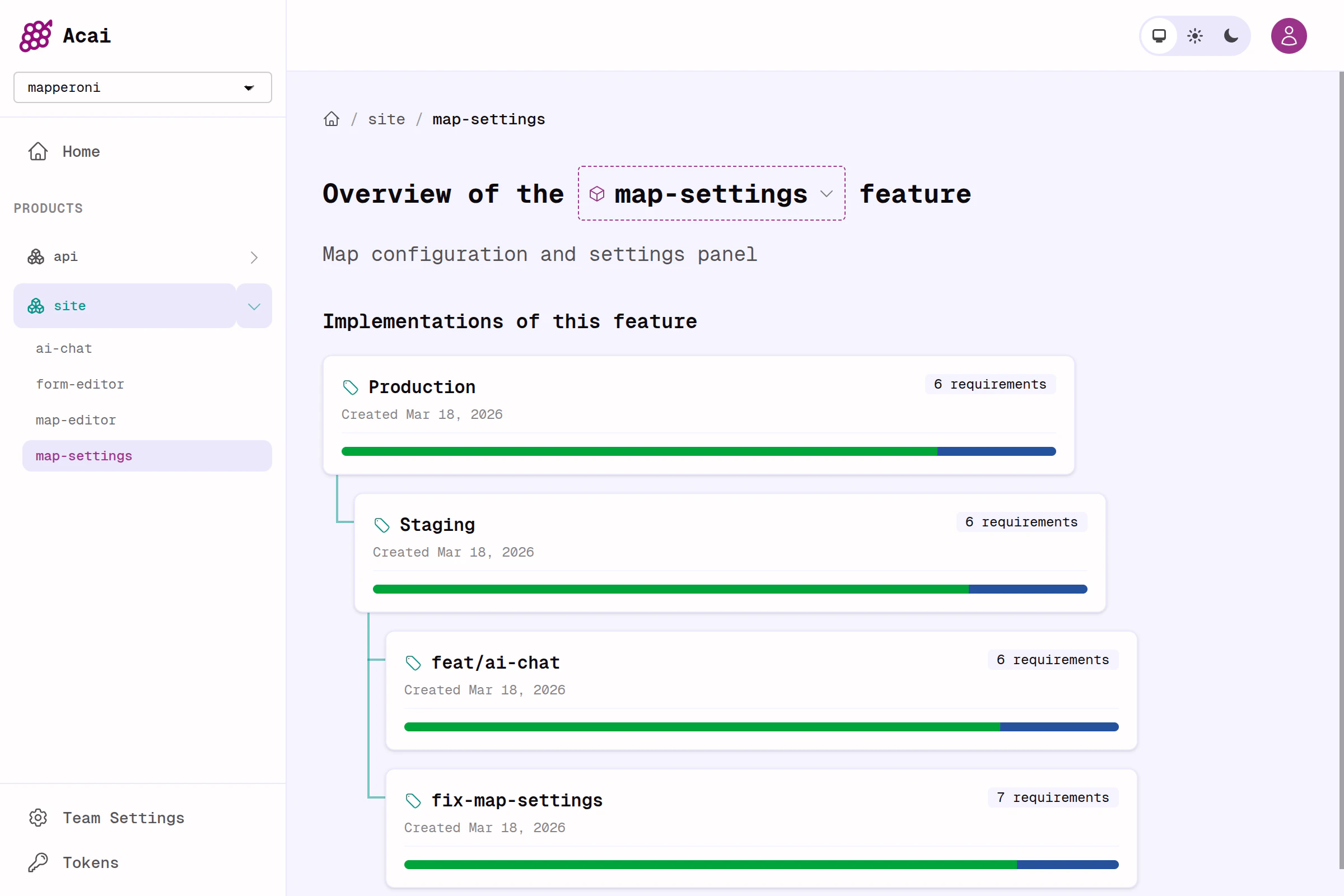
This simple model also works great for more complex monorepos and polyrepo projects. In any case, a team can have many products, and a product can have many features and many implementations, which track many git branches on many repos.

<Frame caption="Example of a product overview showing states of a feature across many implementations.">
  <img src="https://mintcdn.com/acai/LaJ29xrIxyCm5Sr_/images/desktop-feature-view.png?fit=max&auto=format&n=LaJ29xrIxyCm5Sr_&q=85&s=4186752eb6f5df88ca91f1175c767f12" alt="Example dashboard showing a list of implementations of the map-settings feature." width="2400" height="1600" data-path="images/desktop-feature-view.png" />
</Frame>

### Spec journey

So the lifecycle of a feature from draft spec to production may differ from team to team, but the simplest example is this;

<Steps>
  <Step title="Create branch & write spec">
    Create a branch like `feat/carbon-calculator` and draft your `feature.yaml`
  </Step>

  <Step title="Push">
    Run `acai push` to extract the specs and push them to an Acai Server. This creates a new implementation, which is named after your branch by default.
  </Step>

  <Step title="Review">
    Invite your team to review by sending them a link to the Acai.sh dashboard for your new feature + implementation.
  </Step>

  <Step title="Integrate">
    When the spec and code passes QA, merge the code, delete the old implementation.
  </Step>

  <Step title="Push">
    When the feature is merged (e.g. to `main`), push again from the `main` branch so that the dashboard reflects the current state of your app. CI / GitHub actions are useful here.
  </Step>
</Steps>

Some teams prefer to review and merge specs to the main branch before even starting implementation. Other teams might even maintain a standalone `specs` repo. Acai.sh should work for all the common git workflows.