> ## Documentation Index
> Fetch the complete documentation index at: https://acai.sh/llms.txt
> Use this file to discover all available pages before exploring further.
# Acai.sh
> A toolkit for spec-driven software development. Stop writing prompts, start writing specs. Ship better quality software and minimize slop.
export const AnimatedTerminal = () => {
const [messages, setMessages] = useState([]);
const [inputText, setInputText] = useState("");
const [stepIndex, setStepIndex] = useState(0);
const [phase, setPhase] = useState("idle");
const chatRef = useRef(null);
const timeoutsRef = useRef([]);
const STEPS = [{
type: "user-typing",
content: "I made changes to the spec - @animated-terminal.feature.yaml - please run `acai skill` to learn spec-driven development."
}, {
type: "tool-command",
content: "acai skill",
output: ["Skill loaded: acai", "Summary: specs first, then code, then status updates.", "Guidance: use ACIDs to keep implementation and review aligned."]
}, {
type: "agent-message",
content: "I will read the spec to see what changed, then re-align the code to spec."
}, {
type: "tool-command",
content: "acai feature animated-terminal",
output: ["Feature: animated-terminal", "Status: 9 implemented, 1 remaining.", "Next focus: STORY.3-1"]
}, {
type: "agent-message",
content: "I see the new requirement, animated-terminal.STORY.3-1, which adds a demonstration of the `set-status` command. I'll align the code now."
}, {
type: "system-status",
content: "📝 Writing code..."
}, {
type: "agent-message",
content: "Now I will make sure all requirements are well tested."
}, {
type: "system-status",
content: "📝 Writing code..."
}, {
type: "agent-message",
content: "Done. The animation component and ACID references are now aligned with the spec."
}, {
type: "user-typing",
content: "Nice job. I'm testing it now. It looks acceptable. Mark all requirements as accepted."
}, {
type: "tool-command",
content: 'acai set-status \'{"animated-terminal.STORY.3-1":"accepted"}\'',
output: ["Requirements updated: 1"]
}, {
type: "agent-message",
content: "Done. All requirements are now accepted. What should we work on next?"
}];
const clearAllTimeouts = () => {
timeoutsRef.current.forEach(clearTimeout);
timeoutsRef.current = [];
};
const addTimeout = (fn, delay) => {
const id = setTimeout(fn, delay);
timeoutsRef.current.push(id);
return id;
};
useEffect(() => {
return () => clearAllTimeouts();
}, []);
useEffect(() => {
if (chatRef.current) {
const {scrollTop, scrollHeight, clientHeight} = chatRef.current;
const isNearBottom = scrollHeight - scrollTop - clientHeight < 100;
if (isNearBottom) {
chatRef.current.scrollTop = scrollHeight;
}
}
}, [messages]);
useEffect(() => {
if (stepIndex >= STEPS.length) {
setPhase("completed");
return;
}
const step = STEPS[stepIndex];
if (step.type === "user-typing") {
setPhase("typing");
let currentText = "";
const fullText = step.content;
let charIdx = 0;
const typeChar = () => {
if (charIdx < fullText.length) {
currentText += fullText[charIdx];
setInputText(currentText);
charIdx++;
addTimeout(typeChar, 45);
} else {
addTimeout(() => {
setMessages(prev => [...prev, {
type: "user",
content: fullText
}]);
setInputText("");
setStepIndex(prev => prev + 1);
}, 600);
}
};
addTimeout(typeChar, 250);
} else if (step.type === "agent-message") {
setPhase("agent-thinking");
addTimeout(() => {
setMessages(prev => [...prev, {
type: "agent",
content: step.content
}]);
addTimeout(() => {
setStepIndex(prev => prev + 1);
}, 1700);
}, 700);
} else if (step.type === "tool-command") {
setPhase("tool-running");
addTimeout(() => {
const id = Math.random().toString(36).substr(2, 9);
setMessages(prev => [...prev, {
type: "tool",
content: step.content,
status: "running",
id
}]);
addTimeout(() => {
setMessages(prev => prev.map(m => m.id === id ? {
...m,
status: "done",
output: step.output
} : m));
addTimeout(() => {
setStepIndex(prev => prev + 1);
}, 900);
}, 1400);
}, 500);
} else if (step.type === "system-status") {
setPhase("system-working");
addTimeout(() => {
setMessages(prev => [...prev, {
type: "system",
content: step.content
}]);
addTimeout(() => {
setStepIndex(prev => prev + 1);
}, 2200);
}, 600);
}
}, [stepIndex]);
const renderMessage = (msg, idx) => {
if (msg.type === "user") {
return ;
}
if (msg.type === "agent") {
return ;
}
if (msg.type === "system") {
return
{msg.content}
;
}
if (msg.type === "tool") {
return
{msg.status === "running" ? "⚡" : "✓"}
acai
{msg.content.replace("acai ", "")}
{msg.status === "running" &&
running...
}
{msg.status === "done" && msg.output &&
{msg.output.join("\n")}
}
;
}
return null;
};
return
{}
{}
{messages.map((msg, i) => renderMessage(msg, i))}
{}
Agent: taskmaster
Model: Big Pickle
{}
{}
tab agents
ctrl+p commands
 ***
# Key Features
### Go beyond test coverage
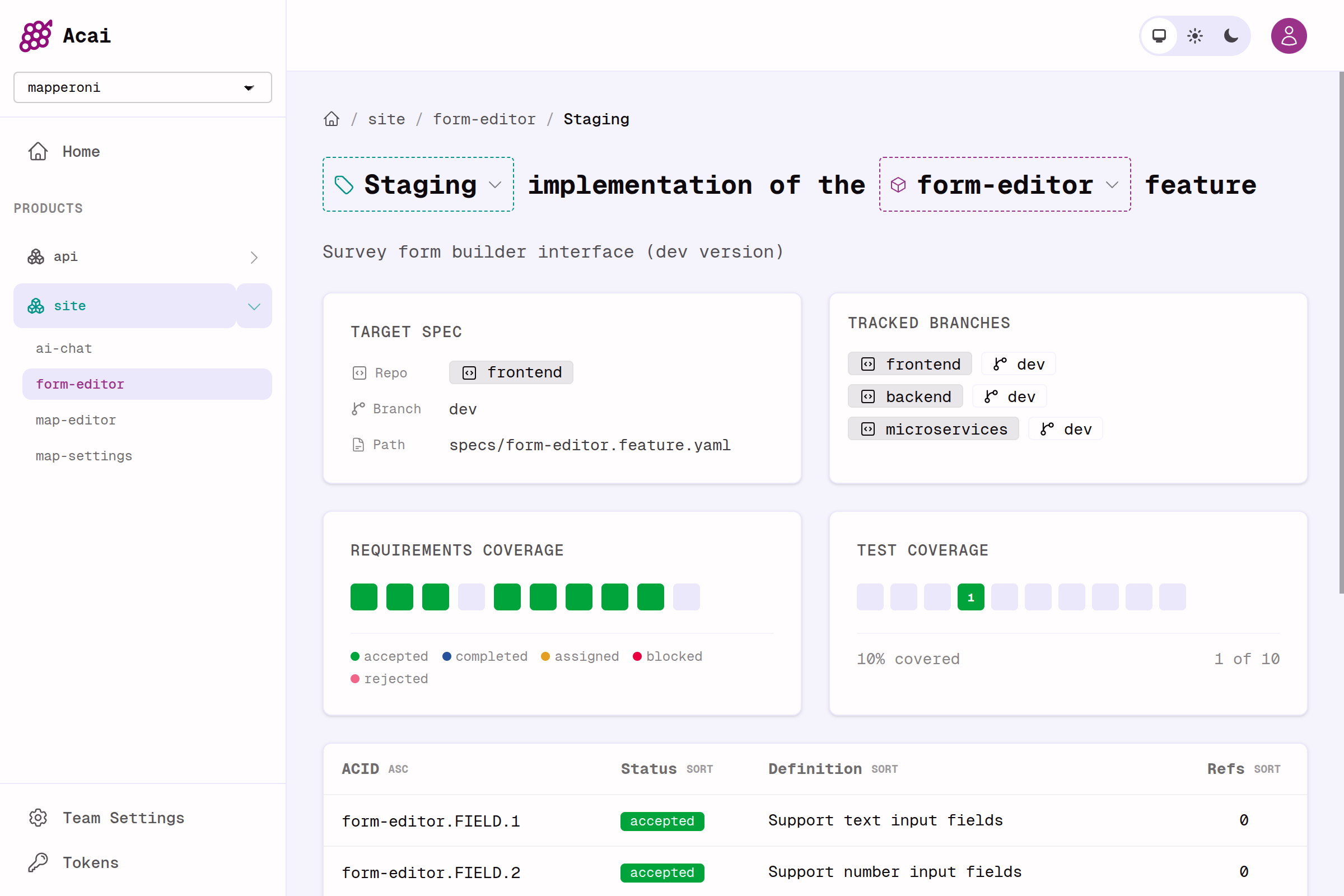
Have all requirements been implemented?\
Do all implementations have tests?\
Have humans QA'd and accepted the implementation?
### Collaborative & multiplayer
Invite your team to a shared Acai dashboard, or create access tokens for AI agents and CLI access to the server.
***
# Key Features
### Go beyond test coverage
Have all requirements been implemented?\
Do all implementations have tests?\
Have humans QA'd and accepted the implementation?
### Collaborative & multiplayer
Invite your team to a shared Acai dashboard, or create access tokens for AI agents and CLI access to the server.
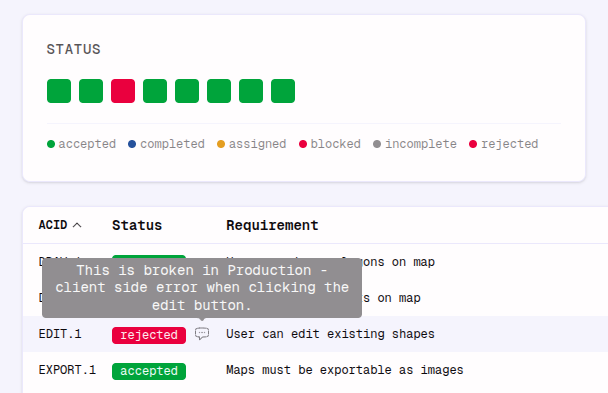 Track progress from spec, to implementation, to agent review, to human acceptance:
`No status` -> `Assigned` -> `Completed` -> `Accepted`
```md Agent Code Reviewer theme={null}
I've reviewed profile.MENU.2 and profile.AUTH.1
I see no issues. Unit tests are satisfactory.
I am marking the requirement as `COMPLETED`...
I am merging the changes to the feature branch...
```
### Any git workflow
Acai works with monorepos and polyrepos or any combination.
* Monorepos containing many products with many specs and many branches (`main`, `dev` etc.)
* Polyrepos where a feature may touch several branches on several git repos (frontend, backend, microservice etc.)
Track progress from spec, to implementation, to agent review, to human acceptance:
`No status` -> `Assigned` -> `Completed` -> `Accepted`
```md Agent Code Reviewer theme={null}
I've reviewed profile.MENU.2 and profile.AUTH.1
I see no issues. Unit tests are satisfactory.
I am marking the requirement as `COMPLETED`...
I am merging the changes to the feature branch...
```
### Any git workflow
Acai works with monorepos and polyrepos or any combination.
* Monorepos containing many products with many specs and many branches (`main`, `dev` etc.)
* Polyrepos where a feature may touch several branches on several git repos (frontend, backend, microservice etc.)
 ### Grab context
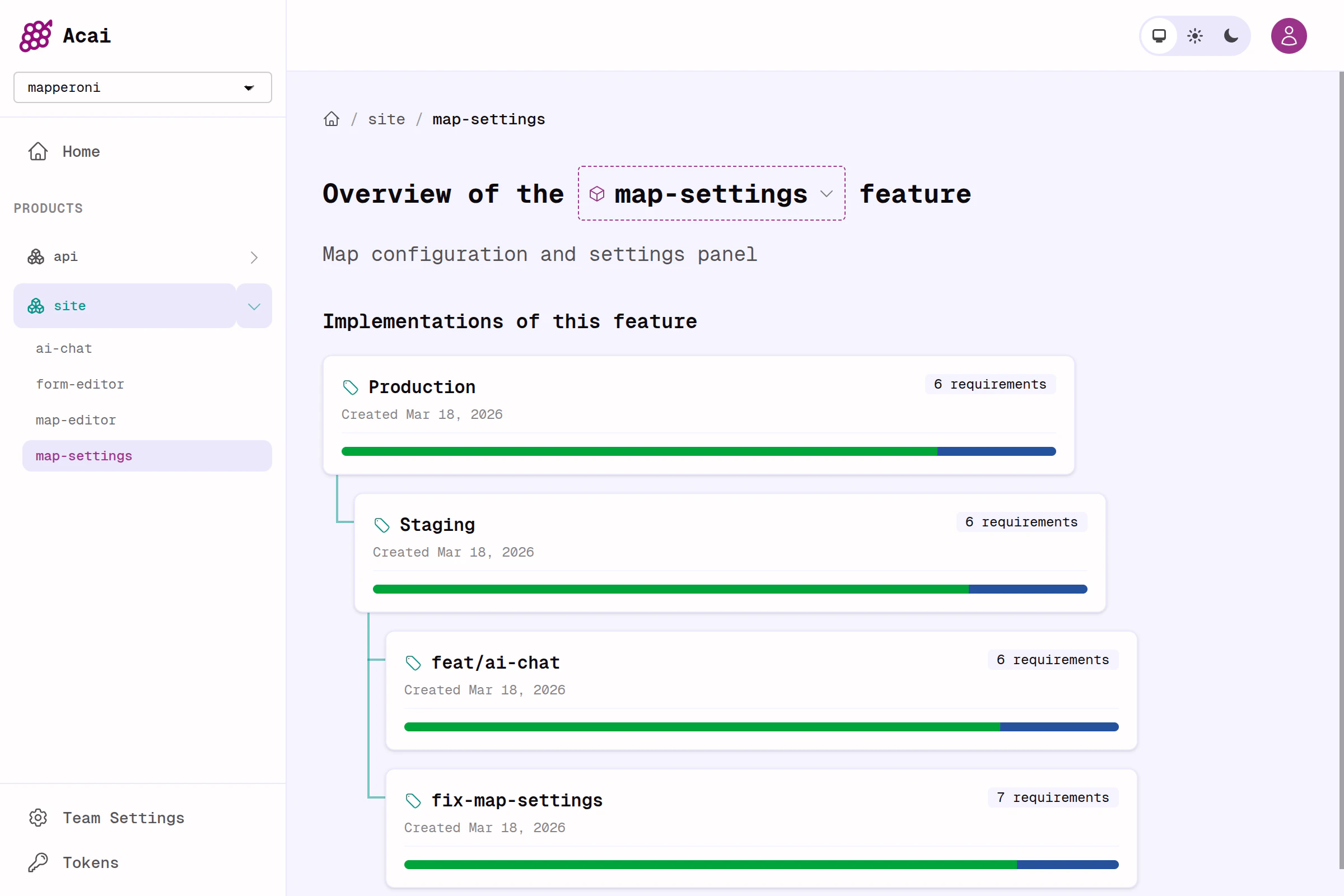
Acai introduces the ACID system for referencing your spec from anywhere in your repo. This makes it easy to see exactly where a requirement has been implemented or tested, so you (or your agent) can improve test coverage, QA, and react to ever-changing requirements.
```sh theme={null}
acai feature my-feature-name --json --include-refs
```
### Review code more effectively
Stop trying to read huge diffs from top to bottom. Instead, use the acai dashboard and jump straight to the functions, tests or comments that reference each requirement in your spec. Start by reviewing the requirements that matter most; auth, security, performance, and user happiness.
***
## Simple example
At the top of the page you can see a fun terminal animation we created as a demo of Acai in action. Below you can see the spec, code, and tests for that animation.
```yaml feature.yaml theme={null}
feature:
name: animated-terminal
product: docs
description: |
A mock terminal animation for our docs site.
It demonstrates how an AI agent uses the acai toolkit to work on a software project.
🥚 In the example, it is self-referentially building itself, from this very same spec.
components:
FRAME:
name: Terminal frame and container
description: UI container that looks like a terminal window on a Mac with a TUI instance running inside it
requirements:
1: Renders scrollable mock chat history
1-1: Does not auto-scroll unless user is already at the bottom of scroll container
2: Renders mock text input
2-1: Does not accept actual user inputs (no typing, no buttons)
STORY:
name: Rough storyboard for the animation
requirements:
1: Animation starts with user typing "I've made some changes to the spec @animated-terminal.feature.yaml - please run `acai skill` to learn spec-driven development."
2: Shows the agent run `acai skill`. Agent says "Got it. I will look to see what changed, then re-align the code to spec."
3: Concludes with user typing "Nice job. I'm looking at it right now. It's flawless. Go ahead and mark all requirements as accepted."
3-1: Agent runs `acai set-status` and marks all requirements as accepted.
4: The animation stops after the final step and does not loop.
constraints:
DEV:
requirements:
1: Must be a single, self-contained standalone react component (a single export, with no imports)
```
```tsx animated-terminal.jsx theme={null}
// animated-terminal.DEV.1 - No imports
export const AnimatedTerminal = () => {
const chatRef = useRef(null);
useEffect(() => {
// animated-terminal.FRAME.1-1 - autoscroll
const el = chatRef.current;
if (el) {
// Use a threshold to detect if the user is "near" the bottom
const isNearBottom = el.scrollHeight - el.scrollTop - el.clientHeight < 100;
if (isNearBottom) el.scrollTop = el.scrollHeight;
}
}, [messages]);
return (
{/* animated-terminal.FRAME.1 */}
### Grab context
Acai introduces the ACID system for referencing your spec from anywhere in your repo. This makes it easy to see exactly where a requirement has been implemented or tested, so you (or your agent) can improve test coverage, QA, and react to ever-changing requirements.
```sh theme={null}
acai feature my-feature-name --json --include-refs
```
### Review code more effectively
Stop trying to read huge diffs from top to bottom. Instead, use the acai dashboard and jump straight to the functions, tests or comments that reference each requirement in your spec. Start by reviewing the requirements that matter most; auth, security, performance, and user happiness.
***
## Simple example
At the top of the page you can see a fun terminal animation we created as a demo of Acai in action. Below you can see the spec, code, and tests for that animation.
```yaml feature.yaml theme={null}
feature:
name: animated-terminal
product: docs
description: |
A mock terminal animation for our docs site.
It demonstrates how an AI agent uses the acai toolkit to work on a software project.
🥚 In the example, it is self-referentially building itself, from this very same spec.
components:
FRAME:
name: Terminal frame and container
description: UI container that looks like a terminal window on a Mac with a TUI instance running inside it
requirements:
1: Renders scrollable mock chat history
1-1: Does not auto-scroll unless user is already at the bottom of scroll container
2: Renders mock text input
2-1: Does not accept actual user inputs (no typing, no buttons)
STORY:
name: Rough storyboard for the animation
requirements:
1: Animation starts with user typing "I've made some changes to the spec @animated-terminal.feature.yaml - please run `acai skill` to learn spec-driven development."
2: Shows the agent run `acai skill`. Agent says "Got it. I will look to see what changed, then re-align the code to spec."
3: Concludes with user typing "Nice job. I'm looking at it right now. It's flawless. Go ahead and mark all requirements as accepted."
3-1: Agent runs `acai set-status` and marks all requirements as accepted.
4: The animation stops after the final step and does not loop.
constraints:
DEV:
requirements:
1: Must be a single, self-contained standalone react component (a single export, with no imports)
```
```tsx animated-terminal.jsx theme={null}
// animated-terminal.DEV.1 - No imports
export const AnimatedTerminal = () => {
const chatRef = useRef(null);
useEffect(() => {
// animated-terminal.FRAME.1-1 - autoscroll
const el = chatRef.current;
if (el) {
// Use a threshold to detect if the user is "near" the bottom
const isNearBottom = el.scrollHeight - el.scrollTop - el.clientHeight < 100;
if (isNearBottom) el.scrollTop = el.scrollHeight;
}
}, [messages]);
return (
{/* animated-terminal.FRAME.1 */}
{messages.map((msg, i) => renderMessage(msg, i))}
);
};
```
```ts animated-terminal.test.ts theme={null}
// When we tag tests with requirement IDs, the acai.sh dashboard automatically tracks coverage!
describe("Constraints", () => {
// animated-terminal.DEV.1 - Dev constraint
it("self-contained standalone component (no imports)", () => {});
});
describe("UI rendering", () => {
// animated-terminal.FRAME.1
it("renders scrollable mock chat history", () => {});
// animated-terminal.FRAME.1-1
it("auto-scrolls ONLY if user is at bottom threshold", () => {});
// animated-terminal.FRAME.2
it("renders mock text input", () => {});
// animated-terminal.FRAME.2-1
it("ignores user typing and button interactions", () => {});
});
```
As shown above, acai gives each requirement an ID that is unique, stable, and readable. These IDs should be referenced liberally (in tests, comments, and other specs), and are extracted from code with a single command.
The idea is when your spec changes, your code must change too.
## Why acai?
LLM agents love Acai IDs. They make it easy to pull in context, find references, and trace the *intent* of an implementation or test.
Stop losing progress when agents go off the rails. Your spec is the source
of truth, even as complexity grows and requirements evolve.
Quickly prototype, try throwaway implementations, and solidify the spec
before touching production code. The result is less time prompting, and a
better end result.
In the past, this level of specification rigour was painful for human teams. Today, for an LLM with access to Acai, it's painless.
***
## Next steps
Get up and running. Write and implement your first spec.
Introduction to acai specs, and best practices for spec-first software.